
Everyone sucks at time management, so do you, and so do I. In reality, we can't manage time; we can only manage ourselves to use the time we have better and more efficiently.
Listen on Apple: https://fastforwardamy.com/apple85
Listen on Spotify: https://fastforwardamy.com/spotify85
Listen on Google: https://fastforwardamy.com/google85
That's why I want to share with you how you can use your calendar for maximum productivity. No expensive tools and subscriptions needed.
For years, even back when I was studying, I have been committed to keeping a super clean and organized calendar to ensure I use my time wisely and spend the right amount of time on the things that matter.
Running two businesses and doing it all – how DO I get it done?!
To this day, I still get questions about how I manage my calendar and what hacks I use to get more done in a day. To answer these questions, I have put together a list with 10 of my TOP tips to help you use your time better.
1. Use color codes
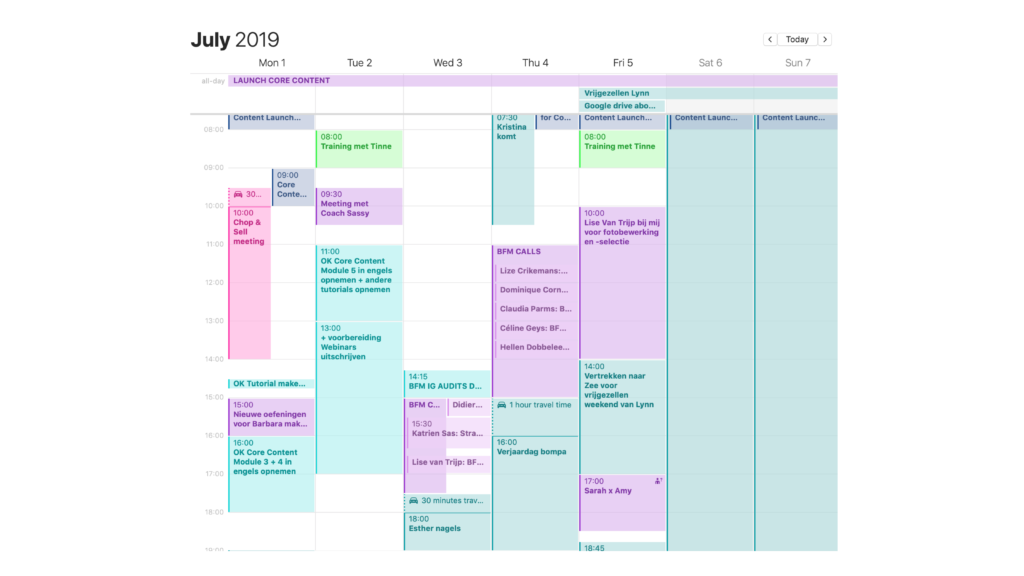
The secret to better arranging your calendar is super simple: use colors.
For example, I have a color for all health-related activities, like working out and coaching.
Then I have another one for proactive work. Working proactively on things include creating outlines for podcasts and content, strategic work, and generally work where I'm on my own, not talking to other people.
Meetings have yet another color, and so on.
Using colors is an excellent way to quickly get an overview of what you're doing when and where. For instance, after a full day of podcast recordings or meetings, I know I should schedule time for self-care or extra me-time. I know I will appreciate a long bath in the evening.
TIP: If you're using the macOS Calendar, you can create different calendars in your calendar to assign colors to specific event types.
2. Time-block your days
Time blocking is all about dedicating blocks to get specific tasks done. For instance, I create time blocks for content creation, meetings, coaching clients, and my CEO days to work proactively on my business.
Now, I also use time blocking to show when I'm available to the team if they want to schedule meetings with me.
Remember: block it and lock it!
3. Batch like a pro
Time blocking and batching go hand in hand. You can't batch if you're not time blocking. It's like mealprepping for your business!
For example, I will block a full day of podcast recordings and record anything from 4-8 episodes instead of doing one recording every single week (that's how I used to do it in the past on Monday mornings in sweatpants, lol, with a lot of stress that comes with it).
Batching and time blocking can also be used for scheduling time with your clients.
Don't make yourself available ALL the time, I see this mistake being made by many coaches.
Instead, set some dedicated time slots with hard limits in your online calendar, making sure your clients will meet you in your specific time slots instead of pushing their calendar on you.
By using dedicated time slots, your time and energy will be safeguarded.
CHALLENGE: block a day in your agenda to create 30 Instagram posts (or posts for any other platform where you're active). If you need help to get started, check our Content Brainstorm Training. It will help you develop content ideas, and you'll get our special mind map exercise.
4. Create action-oriented tasks
When you manage your tasks, don't make them too broad but make them very specific and action-oriented.
Instead of writing ‘podcast' in your calendar, create the following separate tasks:
- Think of 7 topics for the upcoming podcast episode.
- Create the outline for the next podcast episodes airing in July and August.
- Plan out when the specific podcast topics will air.
Knowing the specific tasks you have to do will help you better prepare mentally for what's coming up. Are you going to use the creative, operational, or strategic part of your brain?
To keep track of your tasks, add an ‘OK' in front when you have completed them, and use the note function in your calendar to add important information that will help you complete the task.
IMPORTANT! When you add tasks to your calendar, make sure to be realistic about the time it takes for you to finish. Don't just assign 30 minutes to every task. If something ends up taking 2 hours, your whole planning will crumble. If you have a huge to-do list, something's wrong.
Maybe you're also interested in this: How to Protect your Boundaries, Time and Energy when Life gets Busy
5. Use the travel (make-up) time function
The travel time function is often overlooked. Whereas most calendars have this as an integrated function, if yours doesn't, you can create a separate event manually to indicate time on the road.
Use the travel time function to schedule the time you need to get ready or to get somewhere. This way, you have an overview of how long every task/appointment will be.
6. Avoid filling your calendar with stupid stuff
When you overpopulate your calendar, you'll end up being too busy instead of being productive.
Don't do that!
Once, I was at the point where I would add everything to my agenda, from showering to grocery shopping.
To be productive and effective with your time, you don't have to add every single little task to your calendar. Consider adding some of these smaller tasks in the notes of the event, or add them to your planner or task manager.
7. Use an appointment scheduler
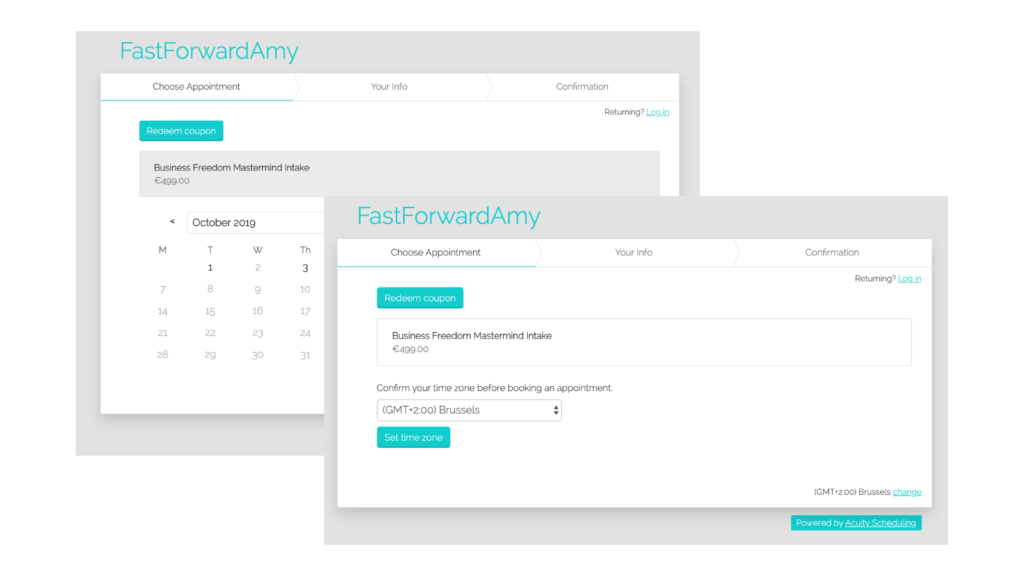
My go-to for scheduling online appointments is Acuity. I used to use it for coaching clients, interviews, podcast recordings, and so on, but now I mainly use it to allow my team to schedule an appointment with me.
The best part of an appointment scheduler like Acuity is that it eliminates the endless back and forth emailing of ‘what's good for you?', and saves you a ton of time.
We have set up our system with a form, too, so team members can prepare for the call and add questions. This also helps me prepare better for what we will talk about, and it prevents me from being caught off guard by a million questions from my team.
8. Create a buffer for unexpected to-dos
When you don't know how much time an activity will take up, it can be good to work with buffers in your calendar.
A while back, when we were building the FastForward team, I lacked planning and underestimated the time we needed for onboarding, answering questions and all of the other things that come with building a team.
To solve this problem, I started creating 2-hour buffer blocks in the morning or afternoon. I get it might seem like a lot, but it really helped me get a grip of what was going on to revisit my daily structure.
TIP! If you end up short on time every day as your organization is changing, put in a temporary daily buffer to free up time.
9. Schedule turnaround time
Turnaround time can entail a lot of different things from business to business.
In our team, turnaround time means giving feedback to team members, reviewing visuals, articles, emails, and general copy. All of this takes up more time than you might think, so I block in one hour of turnaround time every day. For example, reviewing visuals and salespages or adjusting copy.
For you, turnaround time could mean answering emails or responding to clients in Slack. A good idea is to use auto-replies to let people know when or where they can reach you. It's about creating transparency about your availability.
10. Work with hard limits
Being productive and spending your time on the things that matter also implies knowing when to stop and move on to the next task.
Example: If you really want to stop working at 6 pm, then you need to stop work at 6 pm, close your laptop, and don't open it again before the next day. It might help if you put something else in your calendar after 6, so you have to stop. Preferably add something you enjoy doing!
Honestly, I'm not the best at this myself, so I have asked my personal trainer to come over at the end of the day instead of in the morning. This means I have to set hard limits on ending work those days.
You can also implement this with your team for other work types, for instance agree to never schedule meetings that run longer than 5 pm or make sure you only do coaching calls in the afternoon.
Recap and bonus tip ‘Avoid the Sunday scaries'
We're at the end of the 10 tips, and hopefully, all of these will help you set new records for using your time better.
- Use color codes
- Time-block your days
- Batch like a pro
- Create action-oriented tasks
- Use the travel (make-up) time function
- Avoid filling your calendar with stupid stuff
- Use an appointment scheduler
- Create a buffer for unexpected to-dos
- Schedule turnaround time
- Work with hard limits
Before you head out, there's one last thing I would like to share with you.
How to avoid the Sunday scaries.
Do you have thoughts popping up in your head all weekend of all the stuff you've got to do? Schedule it in your calendar or put it on your to-do list right away. Start with scheduling the time you'll need to actually get stuff done and you'll avoid being taunted by your to-do list.
When you block your time like this, it will be easier to say ‘no' and to not take on more tasks or work than you actually have time for.
Remember, you can't manage time, but you can manage yourself. YOU are the starting point for getting shit done!
Watch this episode on YouTube or listen via iTunes, Spotify, or wherever you get your podcasts, and search for episode 85 of The FastForwardAmy Show.
P.S. When I started out my online “entrepreneurial journey,” I googled ENDLESS articles on what the world's finest and wealthiest did for their time management. I bought books and kept devouring endless articles… Until I realized I got it all wrong. The most important thing about time management? Get shit done. So that's what I'm going to help you do with the Time Management Checklist.
You'll get
- 10 strategies to manage your time like a pro.
- Hands-on steps so you can start immediately.
- Become the most productive version of yourself.
Get access to the Time Management Checklist here.

We do not take any responsibility for the financial decisions or any other business-related decisions made by listeners/businesses based on our podcast content. Every business has its own specifics, which we cannot take into account in this podcast.

Leave a Reply